Honda Replacement Lawn Mower Blades: How to Choose and Install
Learn to identify, verify compatibility, and safely replace Honda replacement lawn mower blades with a step-by-step, expert-backed approach from Mower Help.


You will learn how to identify the correct Honda replacement lawn mower blades for your model, safely remove the old blade, install the new blade with proper orientation, and perform a quick safety test. Gather the necessary tools and consult your mower manual to avoid part mismatches before you begin.
Why Honda replacement blades matter
A clean, even cut starts with the blade. For Honda lawn mowers, the blade quality and correct fit influence cutting efficiency, engine strain, and safety. Using the wrong blade or an ill-fitting part can cause vibration, uneven clippings, and potential damage to the deck or spindle. According to Mower Help, selecting the right blade type—OEM or properly approved aftermarket—frames the entire maintenance workflow. The team also notes that many homeowners underestimate blade wear until performance noticeably drops, at which point the mower may pull to one side or leave ragged edges. By prioritizing model-specific blades, you ensure better airflow, more even grass heights, and longer overall mower life. In practice, this means confirming blade length, mounting orientation, and the presence of any center hole or spindle adapter required by your model. When in doubt, consult the owner's manual or reach out to a reputable dealer with your mower's model number. Also, based on Mower Help analysis, compatibility consistency is a key driver for user satisfaction. For DIYers, this section lays the groundwork for safe, effective blade replacement.
Understanding blade types for Honda mowers
Honda mowers typically use straight blades designed for standard cutting, with variations for mulching or high-lift applications that affect suction and clippings dispersal. OEM blades are manufactured to exact factory tolerances and fit the Honda deck geometry, which minimizes vibration and wear. Aftermarket blades can be a cost-effective option if they meet the model’s specifications, mounting hole pattern, and thickness. The main differences to consider are blade width, blade thickness, and the shape of the lift surface. When choosing between OEM and aftermarket, evaluate cutting quality, warranty terms, and the dealer’s return policy. Remember that the blade’s alignment with the spindle and deck is just as important as the blade’s material. Mower Help recommends documenting your mower’s model and blade family to simplify future replacements and avoid compatibility pitfalls.
How to verify compatibility before you buy
Start by locating your mower’s model number and blade type in the owner’s manual or on the deck label. Compare the replacement blade’s part number with the OEM spec printed on your current blade or in the parts catalog. If you cannot locate a part number, take a clear photo of the blade’s shape, mounting hole, and any stamped identifiers and bring it to your local dealer or search the Honda service site. Measure the blade length and note whether the blade has a center hole or a spindle adapter. Some Honda models use specific mounting hardware; in those cases, verify that the new blade includes the correct washers or spacers. If you’re unsure, contact a professional to confirm compatibility before ordering. Finally, review the warranty implications of using aftermarket blades; some warranties require OEM blades for coverage. This careful verification saves time and avoids unnecessary returns.
Safety and prep before blade replacement
Blade work requires full attention to safety. Always disconnect the spark plug boot on gas-powered models and work on a flat, stable surface with the engine cool. Wear heavy-duty gloves and eye protection to guard against sharp edges and small metal shards. Keep the mower clamped or stabilized so the blade cannot rotate during removal. Clear the area of pets and bystanders, and ensure the blade is secured before attempting any disassembly. Good prep reduces the likelihood of accidental injuries or damage to surrounding components. Remember that water or damp surfaces increase the risk of slips while handling sharp blades.
Tools and replacement parts you’ll need
Before you start, gather safety gear, the replacement blade, and the right tooling. Essentials include safety glasses, heavy gloves, a socket wrench or driver with the correct socket for the blade bolt, a blade removal tool or breaker bar (if the bolt is very tight), a torque wrench for final tightening, a rag for cleaning, and, if possible, a blade balancer. Have the replacement blade matched to your model’s part number or blade family. It’s also helpful to have a dealer-approved owner’s manual or online parts guide handy for exact torque guidance and any required spacers. If you don’t have a balancer, you can still complete the replacement, though balancing the blade reduces vibration and prolongs deck life.
Blade orientation and installation considerations
Installing the blade with proper orientation is crucial for performance. Most blades have a curved or lifted edge that should face the mower deck in a specific direction; the spike or tip often points toward the outside of the mower. Inspect the replacement blade to determine which side faces up and ensure the bolt pattern lines up perfectly with the spindle. Use the original washer or spacer unless the replacement kit specifies an alternative. Tighten the retaining bolt firmly, but never exceed the torque spec provided by Honda for your model. If the blade wobbles or makes unusual noises during the first start, re-check the orientation and clearance between the blade and deck.
Post-installation checks and maintenance basics
After mounting, recheck all fasteners and ensure the blade does not contact any part of the mower housing. Reinstall any covers and safety guards you removed. Before starting, insert the spark plug boot and start the mower briefly in a safe, open area to listen for abnormal vibrations or rubbing sounds. If everything runs smoothly, shut down and inspect for debris or loose components. Regular maintenance includes cleaning the deck, checking blade condition every mowing season, and replacing blades when they show chips, cracks, or dull edges that reduce cut quality. Proper care extends blade life and keeps mowing results consistent.
Buying tips: OEM vs aftermarket and warranty considerations
OEM blades guarantee exact fit and are often the preferred choice for warranty protection. If you choose aftermarket blades, ensure they are explicitly listed as compatible with your Honda model and come with proper hardware. Check the warranty terms; some manufacturers limit coverage if aftermarket blades are used. Compare prices, but prioritize fit and balance over savings. Keep a small inventory of spare blades to reduce downtime during peak mowing seasons.
Tools & Materials
- Safety glasses(Eye protection is essential when handling sharp blades.)
- Heavy-duty work gloves(Protection against sharp edges; avoid latex.)
- Socket wrench with appropriate socket(Blade bolt size varies by model; confirm before use.)
- Blade removal tool or breaker bar(Helpful for stubborn bolts.)
- Torque wrench(Use only if torque spec is provided for your model.)
- Replacement blade compatible with your Honda model(Match part number or blade family.)
- Blade balancer (optional)(Helps identify vibration from an unbalanced blade.)
- Rag and degreaser(Clean deck and mounting area before reinstall.)
- Owner’s manual or parts guide(Refer to exact torque specs and part numbers.)
Steps
Estimated time: 30-60 minutes
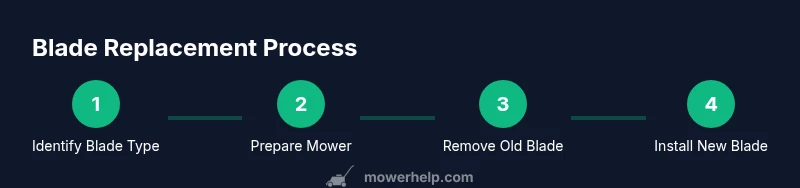
- 1
Identify blade replacement needs
Locate your mower’s model number and blade family. Compare the replacement blade’s part number to the OEM spec and confirm mounting requirements before purchasing.
Tip: Having the model number handy speeds up compatibility checks. - 2
Prepare and secure the mower
Place the mower on a flat surface, engage the parking brake (if applicable), and disconnect the spark plug wire to prevent accidental starts.
Tip: Do not perform blade work with the engine hot or the mower resting on an unstable surface. - 3
Remove the old blade
Use the proper socket to loosen the blade bolt while keeping the blade from turning. Remove the bolt, washer, and blade and set them aside.
Tip: Keep hardware organized in a labeled container. - 4
Inspect mounting area
Check the spindle, deck, and mounting hardware for wear or damage. Clean any debris from the deck to ensure proper seating of the new blade.
Tip: Address any obvious damage before installation. - 5
Install the replacement blade
Position the new blade with the correct orientation, align the bolt holes, and reinstall the washer and bolt. Hand-tighten first, then snug with a wrench.
Tip: Ensure no fingers are near the blade edge during installation. - 6
Secure and verify torque
If a torque spec is provided, tighten to spec and re-check after initial run. If no spec is provided, snug firmly per OEM guidance.
Tip: Over-tightening can strip the bolt or bend the blade. - 7
Test run and balance check
Reconnect the spark plug, remove any safety guards only as required, and run the mower in a clear area to listen for strange noises. If vibrations persist, recheck blade balance or orientation.
Tip: Use a blade balancer if you notice persistent vibration.
Got Questions?
Can I use aftermarket blades on a Honda mower?
Aftermarket blades can be used if they are explicitly listed as compatible with your Honda model and include the correct mounting configuration. Verify fit and warranty terms before purchasing.
Yes, but only if the blade is listed as compatible with your model and you follow the correct mounting procedures.
What safety precautions should I take before replacing the blade?
Disconnect the spark plug, work on a flat surface, wear gloves and eye protection, and ensure the blade is immobilized before removal.
Disconnect the spark plug, wear protective gear, and stabilize the blade before removal.
How do I know if the blade is dull and needs replacement?
Look for ragged cuts, excessive push, or visible nicks and bends. If the cut quality drops, replace the blade rather than attempting to sharpen repeatedly.
If the mower struggles to cut evenly or leaves uneven patches, replace the blade.
How often should I replace Honda mower blades?
Replacement intervals depend on mowing frequency, grass type, and terrain. Inspect blades regularly; replace when dull, nicked, or damaged.
Check blades often and replace when damaged or dull.
Where can I find the blade part number for my Honda mower?
Look on the blade edge or consult the owner’s manual or Honda parts catalog. A dealer can confirm exact part numbers with your model.
Check the blade itself or the manual to confirm the exact part number.
Is blade balancing necessary after replacement?
Balancing is recommended if you notice vibration or if a replacement blade wobbles. A balancer helps ensure smooth operation and longer deck life.
Balancing helps prevent vibration and wear; use a balancer if you notice wobble.
Watch Video
The Essentials
- Match blade to model and part number.
- Install with correct orientation and secure hardware.
- Test in a safe area and balance if needed.
- Refer to OEM guidance for torque specs and warranties.